A typical Sri Lankan business today keeps customer data in a dozen places it never sees: email in Microsoft 365 or Google Workspace, contacts in a CRM, orders in an online store platform, invoices in cloud accounting, files in OneDrive, chats in WhatsApp Business and backups in a data centre overseas. Almost none of those servers are in Sri Lanka. That is normal and usually sensible, because large cloud providers run secure, resilient infrastructure. But Sri Lanka’s Personal Data Protection Act (PDPA) includes specific rules for processing personal data outside the country, and its core obligations are expected to apply from 1 January 2027. This guide explains, in plain terms, what the Act says about data abroad, what is still being finalised and the practical steps businesses can take now. It is general information, not legal advice.
Key points
- Storing or processing Sri Lankan personal data on cloud servers abroad counts as processing outside Sri Lanka under the PDPA.
- Section 26 of the Act allows this where the destination is approved through an adequacy decision, or where binding safeguards are in place.
- The Data Protection Authority has published draft directives on the instruments that can provide those safeguards.
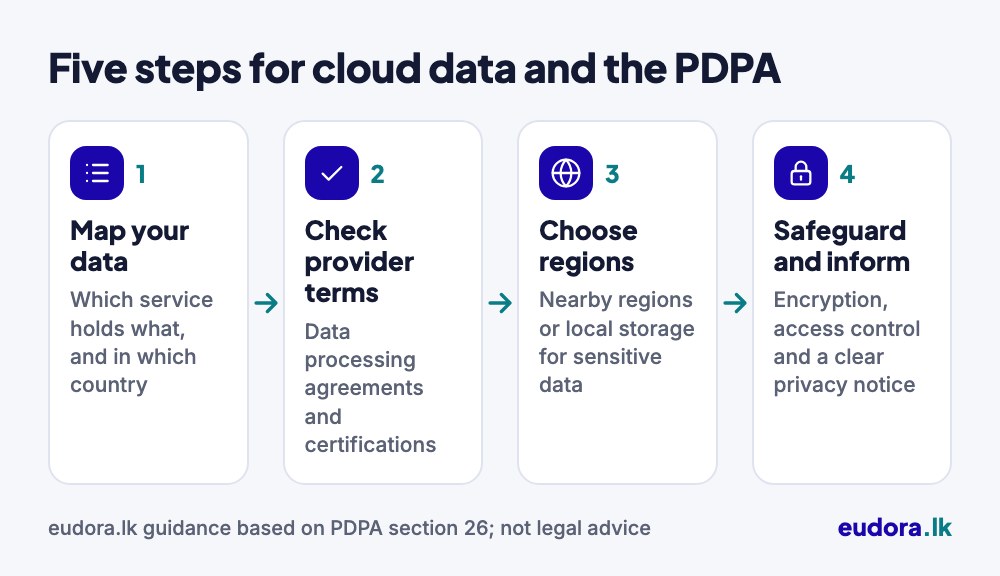
- Start with a data map: what personal data you hold, in which service, and in which country.
- Prefer reputable providers with clear data processing terms, encryption and regional data centres close to Sri Lanka.
Why cloud usually means “abroad”
The large cloud platforms that power most business software run data centres in regions around the world. For users in Sri Lanka, the nearest major regions are in India and Singapore, and many software-as-a-service providers store data in Europe or the United States. A small number of local hosting providers and data centres offer storage within Sri Lanka. For a typical business using Microsoft 365, Google Workspace, an online store platform and cloud accounting, most customer data is therefore held outside the country. Our guide to what cloud native means explains why services are built this way.
What the PDPA says about data abroad
The Personal Data Protection Act No. 9 of 2022, amended in 2025, applies to organisations that process personal data in Sri Lanka or that offer goods and services to people in Sri Lanka. Section 26 deals with processing personal data outside Sri Lanka. In broad terms it provides two routes.
| Route | How it works | Status in late 2026 |
|---|---|---|
| Adequacy decision | The Minister prescribes third countries whose protections are considered adequate; processing there is permitted under that decision | Check the Data Protection Authority for any published list |
| Binding instruments | Where a country is not prescribed, processing must be covered by safeguards such as binding agreements, binding corporate rules, approved codes of conduct, certification schemes or a cross-border processing impact assessment | The Authority has published draft directives describing these instruments |
Public authorities face additional rules on categories of data that must stay in Sri Lanka, and the Authority has issued draft guidance on classifying public-sector data. For private businesses, the practical message is that sending personal data to a cloud service abroad is possible, but should be backed by appropriate contractual and technical safeguards. Our overview of the PDPA’s 2027 start date covers the Act’s wider duties.
Note: Directives and adequacy decisions may still change before and after 1 January 2027. Check the Data Protection Authority’s website for the current position, and take legal advice for high-risk processing such as health or financial data.
Step 1: map your data
You cannot protect what you have not listed. Make a simple spreadsheet of every system that holds personal data about customers, staff or suppliers: the service name, what data it holds, roughly how many people, who in the business owns it, and where the provider stores the data. Provider websites and admin consoles usually state the data location. Include the less obvious places, such as WhatsApp Business, CCTV cloud storage, website contact forms, email marketing tools and backups.
| System | Personal data | Typical location | What to check |
|---|---|---|---|
| Email and documents | Customer emails, contracts, staff files | Provider’s regional data centres | Data location shown in the admin centre; data processing terms |
| Online store | Names, addresses, phone numbers, orders | Your hosting provider or platform | Server location; backup location |
| Cloud accounting and POS | Customer accounts, invoices | Vendor’s cloud | Export options; vendor’s privacy terms |
| Cloud backup | Copies of everything above | Backup provider’s data centre | Encryption before upload; retention |
| CCTV cloud storage | Images of customers and staff | Camera maker’s cloud | Region; retention; access controls |
Step 2: check provider terms
Reputable cloud providers publish data processing agreements or addendums that describe how they handle personal data on your behalf, the security measures they use, where data is stored, which subcontractors they use and how they help you respond to individuals’ requests. Many also publish international certifications such as ISO 27001. Keep copies of these terms with your data map. For smaller or local software vendors, ask directly; a vendor that cannot say where your data is stored is a risk.
Step 3: choose regions sensibly
Where a service lets you choose the data location, choose deliberately. Regions in India or Singapore give fast response times for users in Sri Lanka. For your own cloud servers and backups, choose the region when you create them; our guide to moving to a cloud server covers the setup. For sensitive data that you prefer to keep in the country, a local hosting provider or an on-premises NAS is an option, combined with a carefully chosen off-site copy.

Step 4: add technical safeguards
- Encryption: use services that encrypt data at rest and in transit; for backups, prefer encryption on your own computer before upload so the provider cannot read the data.
- Access control: individual accounts, two-factor authentication and least-privilege permissions for everyone who can see personal data.
- Minimisation: collect and keep only what you need, and delete old records on a schedule.
- Logging: keep audit logs of who accessed and exported data where the service provides them.
- Exit plan: make sure you can export your data and have it deleted if you leave the service.
Our guide to managed cloud backup explains encryption before upload, and our two-factor authentication guide covers account security.
Step 5: tell people
Your privacy notice should explain, in plain language, what personal data you collect, why, who it is shared with, including cloud service providers, and whether it is processed outside Sri Lanka. Customers rarely object to well-known cloud services, but they expect to be told. Update the notice on your website and at the counter where you collect data, such as loyalty schemes.
Handling requests from individuals
The PDPA gives people rights over their data, such as access, correction and, in some cases, erasure. When data is spread across several cloud services, responding to a request means searching each one. Your data map makes this quick: for each system, note how to find a person’s records and how to export or delete them. Most major services provide search, export and deletion tools in their admin consoles. Keep a simple log of requests received, what you did and when you replied, so you can show the request was handled properly.
A note on AI tools
Staff increasingly paste customer emails, documents and spreadsheets into AI chat tools. Many of these services process data abroad and some may use inputs to improve their models unless settings are changed. Treat AI tools like any other cloud service: decide which are approved, use business accounts with data controls, and do not enter personal data into tools that are not covered by appropriate terms. Our guide to AI privacy settings shows where the relevant settings are.
Keeping it proportionate
For most small businesses, compliance does not mean moving data back to Sri Lanka. It means knowing where data is, choosing reputable providers, having their terms on file, securing accounts, keeping only what you need and explaining it honestly to customers. Businesses handling sensitive data at scale, such as clinics, financial services and large retailers, should go further, with formal assessments and legal advice. Our small business security check at Rs 24,900 includes a review of where your data is held and how it is protected; see our cybersecurity services.
-
 QuoteESET
ESET PROTECT Business Endpoint Security – Quote per Device
Price on request
Request a quote
-
 UGREEN
 NASync DH2300 2-Bay NAS – Personal Cloud Storage (Diskless)
Rs 88,500
Add to cart
-
 Western Digital
WD My Passport 2TB Portable Hard Drive – USB 3.2, Hardware Encryption
Rs 41,500
Add to cart
Frequently asked questions
Is it illegal to store Sri Lankan customer data abroad?
No. The PDPA permits processing outside Sri Lanka where the destination is approved or appropriate safeguards are in place.
Does Microsoft 365 or Google Workspace count?
Yes. Data stored in their overseas data centres is processed outside Sri Lanka, so check their data processing terms and data location.
When do these rules apply?
The Act’s core obligations are expected to apply from 1 January 2027. Check the Data Protection Authority for current directives.
Should I move my data to a Sri Lankan server?
Not necessarily. Reputable overseas services with proper safeguards are usually acceptable. Some sensitive or public-sector data may need local storage.
What is a data processing agreement?
A contract in which a service provider commits to how it will handle personal data on your behalf, including security and use of subcontractors.
This article was originally published on eudora.lk.