
Most small business websites change only a few times a year: a new service, updated prices, an extra photo. Yet many run on a full content management system, with a database, dozens of plugins and a server that builds every page from scratch for every visitor. That flexibility has a cost: monthly updates, security risks from outdated plugins and slower pages on cheap hosting. A static website takes a different approach. Pages are built once, ahead of time, and served as ready-made files from a global network, with small serverless functions handling forms and other dynamic features. This cloud native pattern is popular with developers because it is fast, secure and inexpensive to host. This guide explains how it works, when it beats WordPress and when it does not.
Key points
- A static website is built in advance into plain HTML files and served from a content delivery network.
- Static sites load very fast, have almost nothing to hack and often host for free or very little.
- Serverless functions add forms, bookings and small features without running a server.
- Editing is less convenient than WordPress unless a headless CMS or site builder is added.
- Static suits brochure sites, landing pages and documentation; WordPress or WooCommerce suits frequent editing and online stores.
How static and dynamic sites differ
On a typical WordPress site, every time someone opens a page, the server runs PHP code, queries a database and assembles the page, unless a caching plugin has saved a copy. On a static site, every page was generated in advance by a static site generator such as Hugo, Astro or Eleventy, and saved as HTML, CSS and images. When a visitor opens a page, the file is simply sent, usually from a server close to them on a content delivery network.
| WordPress (dynamic) | Static site with serverless functions | |
|---|---|---|
| How pages are made | Built for each visit, or cached | Built once when content changes |
| Speed | Good with caching and good hosting | Very fast, served from the edge |
| Security exposure | Plugins, themes, logins and database | Very small; no database or admin page on the live site |
| Hosting cost | Hosting plan | Often free or very low for small sites |
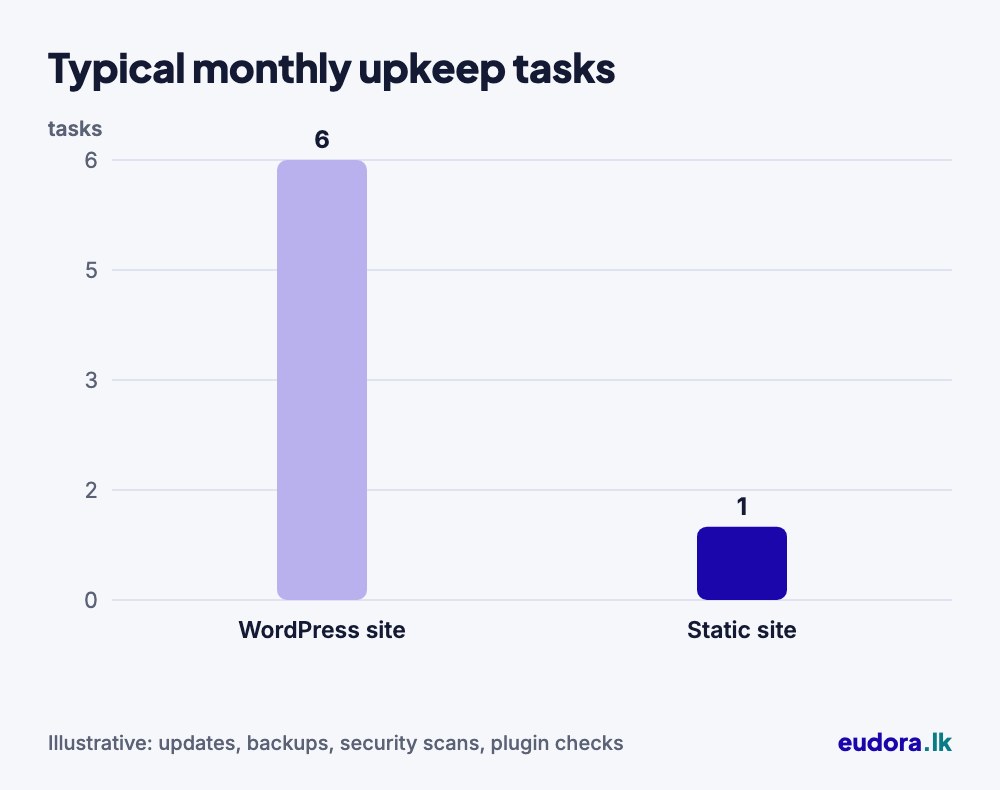
| Monthly maintenance | Core, theme and plugin updates | Very little |
| Editing | Easy visual editor for staff | Developer or headless CMS needed |
| Online shop | WooCommerce | Possible with third-party services, more complex |
Where serverless fits in
Static pages cannot process a contact form or check availability on their own. That is where serverless functions come in: small pieces of code that run on the hosting platform only when called, such as when someone submits a form. You pay nothing, or very little, when they are idle, and there is no server to patch. Typical uses for a small business include sending contact and quote form submissions to email or WhatsApp, saving enquiries to a spreadsheet or CRM, checking a booking calendar, and handling newsletter sign-ups.
Platforms such as Cloudflare Pages, Netlify and Vercel combine static hosting, serverless functions and automatic deployment from a code repository. Each has a free tier that covers many small business sites, with paid plans for higher traffic or team features. Our guide to what cloud native means explains how this fits the wider picture.
Tip: Keep the domain name registered in your business’s name, not the developer’s, whatever hosting you choose. A .lk domain with DNS management costs Rs 5,500 a year.
Why static sites are so secure
Most small business website hacks exploit outdated WordPress plugins, weak admin passwords or vulnerable hosting software. A static site removes most of those targets. There is no admin login on the live site, no database to inject into and no plugins running on the server. The files themselves are served by a large provider’s network, which also absorbs most denial-of-service attacks. What remains to protect is the code repository, the hosting account and the domain, which need strong passwords and two-factor authentication; our two-factor authentication guide explains how.
Speed and search rankings
Because static pages are pre-built and served from nearby edge locations, they load quickly even on mobile connections, which helps both visitors and search rankings. Google measures loading speed, responsiveness and visual stability through Core Web Vitals, and static sites usually score well with little tuning. Our guide to Core Web Vitals and website speed explains the measurements.
Previewing pages on a large, accurate screen helps catch layout problems before they go live. Web designers often check sites on a 27-inch WQHD monitor such as the MSI Modern MD272QXP at Rs 101,500, alongside a phone, to see both desktop and mobile layouts.

The editing question
The main drawback of a static site is editing. On WordPress, staff log in and change text in a visual editor. On a basic static site, content lives in files in a code repository, so changes usually go through a developer. There are ways around it. A headless CMS such as Decap, Sanity, Contentful or Storyblok gives staff an editing screen and rebuilds the site automatically when they save. Some site builders also export static sites. For sites that change rarely, many businesses simply ask their web provider to make occasional updates.
When static is the right choice
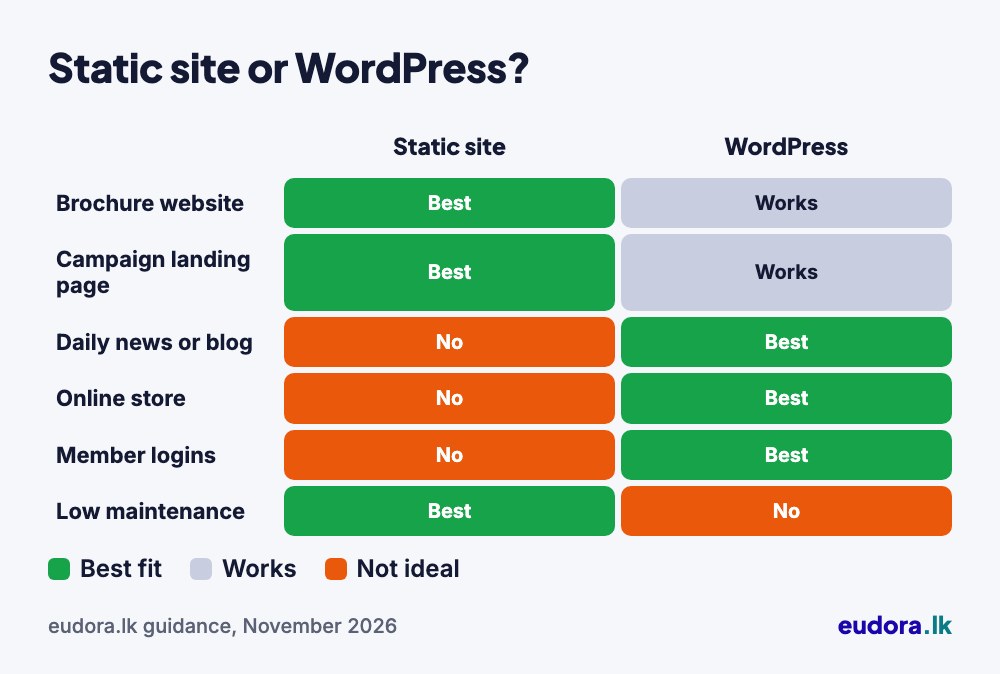
- Brochure websites for professional services, clinics, tuition classes and consultants that change a few times a year.
- Landing pages for campaigns, events and product launches that need to load fast under heavy traffic.
- Documentation and help centres that are mostly text.
- Portfolio sites for photographers, architects and designers, where speed shows off the work.
When WordPress is still better
- Online stores with many products, stock levels and local payment gateways, where WooCommerce is mature and well supported.
- News and blog sites updated daily by several staff members.
- Membership sites with logins, courses or member-only content.
- Sites relying on specific plugins, such as complex booking or directory plugins.
Our guide to shared hosting, VPS and cloud servers covers hosting choices for WordPress sites, and our AI website builders versus custom websites guide compares other ways to build a site.
How updates are published
On a modern static setup, the site’s files live in a code repository such as GitHub or GitLab. When a developer or the headless CMS saves a change, the hosting platform notices, rebuilds the site in a minute or two and publishes the new version to every edge location at once. Each version is kept, so if a change breaks something, the previous version can be restored with a click. Most platforms also create a private preview address for every proposed change, so the business owner can check new text and photos before they go live. This is the same automated, repeatable deployment that large cloud native teams use, scaled down to a small website.
The workflow also creates a full history of every change: who changed what and when. For businesses in regulated fields, such as clinics or financial advisers, that history is a useful record of what the website said on any given date.
Bookings, payments and other dynamic features
A static site does not mean a static business. Many dynamic features are best handled by specialist services embedded in the page rather than built into the website itself. Booking tools, online payment links from local payment gateways, live chat, WhatsApp buttons, maps, review widgets and newsletter forms all work on static sites. The website stays simple and fast, while each service handles the complicated part and keeps its own data secure. Choose services that store data responsibly, and list them in your privacy notice.
Moving an existing site
An existing WordPress brochure site can be converted to static in several ways: exporting it with a static export plugin, rebuilding it in a static site generator with the same design, or keeping WordPress privately as an editing tool and publishing a static copy. Keep the same page addresses, or add redirects, so search rankings are not lost. Forms need to be reconnected to a serverless form handler or form service. Test everything on a preview address before switching the domain.
Costs in practice
For a small business, the hosting bill for a static site is often nothing on a free tier, with costs mainly for design, development and the domain. Our Starter Website at Rs 29,900 includes up to five pages, mobile-friendly design, a contact form and WhatsApp button with first-year hosting; with a .lk domain the first year comes to Rs 35,400. For ongoing updates and monitoring, our website care plan costs Rs 4,900 a month. See our website design page for options.
Frequently asked questions
What is a static website?
A site whose pages are built in advance into ready-made files, instead of being generated by a server for each visitor.
Can a static website have a contact form?
Yes, using a serverless function or a form service that emails submissions to you.
Is a static site good for SEO?
Yes. Static sites are fast and clean, which helps search rankings, as long as content and page titles are good.
Can I edit a static site myself?
With a headless CMS or editing tool added, yes. Otherwise, changes usually go through a developer.
Should my online store be static?
Usually not. WooCommerce or a hosted store platform handles products, stock and payments more easily.
This article was originally published on eudora.lk.