
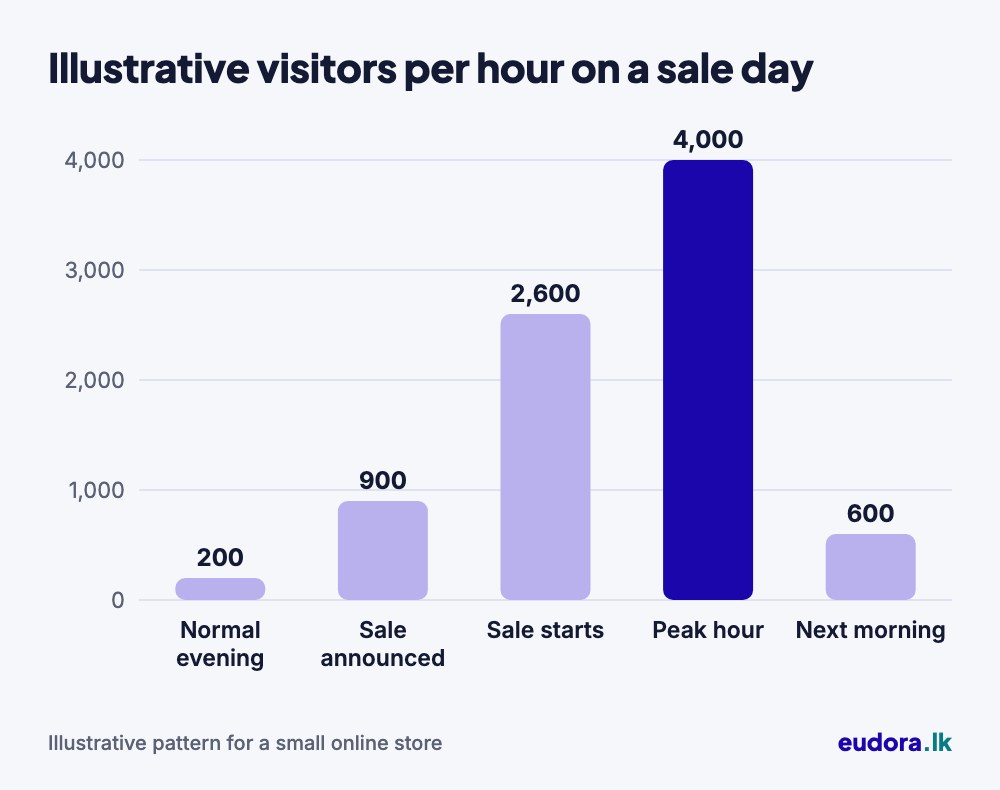
For an online store, the busiest days are the most valuable, and the most dangerous. An Avurudu sale, a Christmas promotion, a payday offer or a post from a popular influencer can bring ten or twenty times the usual visitors in an hour. If the site slows to a crawl or shows errors, customers leave, carts are abandoned and the money spent on advertising is wasted. Most small business stores in Sri Lanka run on WooCommerce or a similar platform on modest hosting that is perfectly adequate for normal days. Surviving the spikes takes a few cloud native techniques: caching, a content delivery network, a well-tuned database and, for larger stores, hosting that can scale up on demand. This guide explains each one and gives a practical checklist for sale days.
Key points
- Product and category pages can be cached and served from a CDN; carts, checkout and account pages cannot, so they decide how much load the server takes.
- Optimised images, fewer plugins and an object cache make the biggest difference for WooCommerce.
- E-commerce hosting with prioritised resources suits most growing stores; cloud hosting adds the ability to scale for big events.
- Load test before a major sale, not during it.
- Check payment gateway, SMS and courier integrations can handle the volume too.
Why online stores struggle under load
A brochure website shows the same page to everyone, so it can be cached completely and served from memory or a CDN. An online store is different. Every visitor with something in their cart sees a personal page, and every checkout writes orders, updates stock and talks to the payment gateway. Those requests go all the way to the web server and database. On sale day, the number of shoppers adding to cart and checking out at the same time is what overwhelms a store, not the number of people browsing.
| Page type | Can it be cached? | Load on the server |
|---|---|---|
| Home, category and product pages | Yes, for visitors without a cart | Low when cached |
| Images, CSS and scripts | Yes, on a CDN | Almost none |
| Search and filters | Partly | Medium to high |
| Cart and mini-cart updates | No | High |
| Checkout and payment | No | Highest |
| My account and order history | No | Medium |
Start with the basics
Before thinking about bigger servers, fix what slows every page. Compress and resize product images, and serve them in modern formats. Remove plugins you do not use, and replace heavy ones with lighter alternatives. Use a fast, well-coded theme. Turn on page caching for anonymous visitors. These changes often double the number of visitors a store can handle on the same hosting. Our guide to Core Web Vitals and website speed covers the details.
Content delivery networks
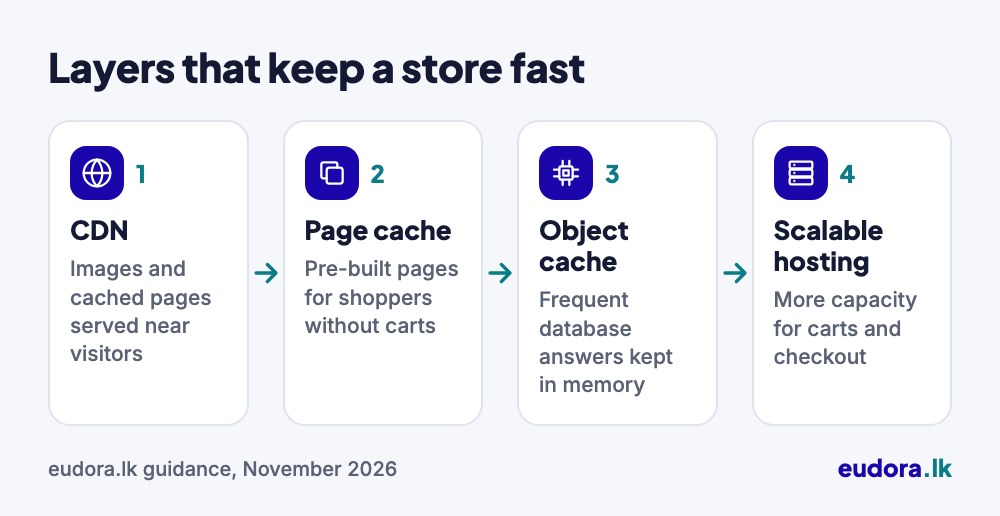
A CDN keeps copies of images, scripts and cacheable pages in data centres around the world and serves them from the one nearest each visitor. For a Sri Lankan store, that means faster pages for local shoppers and for customers abroad, and far less traffic reaching your server. Most CDNs also filter malicious traffic and absorb denial-of-service attacks, which sometimes coincide with big sales. A CDN is one of the most effective cloud native additions for any store; our guide to static websites and edge hosting explains how edge networks work.
Object caching and the database
WooCommerce makes many database queries for each page. An object cache such as Redis or Memcached keeps the results of frequent queries in memory, so the database is not asked the same question thousands of times. Combined with a tuned database, regular cleanup of expired sessions and old orders, and well-indexed tables, it can cut checkout response times dramatically. Specialised e-commerce hosting usually includes these optimisations.
Choosing hosting that copes
For most growing stores, specialised e-commerce hosting is the right step: servers tuned for WooCommerce, more resources, frequent backups, malware scanning and priority support. Our eCommerce Hosting plan costs Rs 14,900 a year; with our website care plan for updates and monitoring, the first year comes to Rs 73,700. Our guide to shared hosting, VPS and cloud servers explains the differences.
Larger stores with regular big events benefit from cloud hosting that can scale. Options include resizing a cloud server before a sale and shrinking it afterwards, separating the database onto a managed database service, and, for the biggest stores, running several web servers behind a load balancer that adds capacity automatically as traffic rises. Our cloud server setup service at Rs 24,900 covers the initial build. This is where cloud native design pays off, but it needs careful setup and monitoring.
Tip: If you plan to resize a server for a sale, do it the day before and test, not an hour before the promotion starts. Resizing can involve a short restart.
Waiting rooms for the biggest moments
For flash sales and limited launches, where demand can exceed any reasonable capacity, a virtual waiting room lets visitors queue fairly and admits them to the store at a rate the site can handle. Several CDN providers offer this as a feature. It is better for customers to wait a minute in a clear queue than to see errors and give up, and it protects checkout for those already buying.
Load test before the sale
Do not discover your store’s limits on sale day. A load test simulates many visitors browsing, adding to cart and checking out, while you watch response times and errors. Test on a staging copy of the store with the same hosting, using a test payment mode, and increase the load until performance drops. That tells you how much headroom you have and where the bottleneck is: often a slow plugin, a heavy search or the database. Run the test again after each fix.
Do not forget the integrations
A store is only as fast as its slowest connection. Payment gateways, SMS order confirmations, courier booking and stock sync with a POS system all receive more requests on sale days. Check rate limits and capacity with each provider, and make sure the store handles a slow response gracefully rather than freezing. If your shop uses a cloud POS that syncs stock, confirm it can keep up; our guide to cloud POS and inventory systems covers stock sync.
Sale-day checklist
- One week before: load test, apply updates, clear old sessions and test backups.
- Two days before: freeze plugin and theme changes; confirm hosting capacity and resize if needed.
- The day before: warm the cache, test checkout with a real low-value order and confirm monitoring alerts reach two people.
- During the sale: watch response times and errors, keep someone available to act, and pause heavy marketing emails if the site struggles.
- After the sale: review what happened, shrink resources back and fix anything that slowed down.
Monitoring that tells you in time
On a sale day, minutes matter. Set up external uptime monitoring that checks the home page, a product page and the checkout page every minute, and alerts two people by phone notification or SMS. Watch server processor, memory and database load on the hosting dashboard. Many stores also track live orders per minute on a simple dashboard that the owner can watch from a phone; a sudden drop to zero during a busy period is often the first sign that checkout or the payment gateway has failed, even when the home page still loads.
After each big sale, write down the peak visitors, peak orders per minute and any slow moments. Those numbers make the next sale’s planning much easier and show when the store has genuinely outgrown its hosting.
Security under pressure
Busy sales attract more bots: price scrapers, credential stuffing attacks on customer accounts and card testing on checkout pages. A CDN with a web application firewall, rate limits on login and checkout, and CAPTCHA or bot checks on suspicious traffic protect both performance and customers. Keep WooCommerce, the theme and plugins updated, and use strong passwords and two-factor authentication for every admin account. Our e-commerce services include security setup and monitoring.
When to rebuild instead
If a store regularly struggles despite good hosting and optimisation, the cause may be its structure: hundreds of plugins, a heavy page builder or years of accumulated customisations. A rebuild on a clean, well-coded setup can be more effective than ever larger servers. Our eCommerce Pro Store at Rs 169,900 covers up to 500 products with custom design, courier and SMS integrations, and is built for performance from the start.


Frequently asked questions
How many visitors can my WooCommerce store handle?
It depends on hosting, plugins and how many shoppers check out at once. A load test is the only reliable way to know.
Does a CDN help an online store?
Yes. It serves images and cacheable pages from nearby locations and reduces load on your server, though carts and checkout still reach the server.
Do I need a cloud server for a sale?
Not always. Many stores cope well on optimised e-commerce hosting. Cloud servers help large stores with frequent big events.
What is a virtual waiting room?
A queue page that admits visitors at a controlled rate during extreme demand, protecting checkout from overload.
Should I update plugins before a sale?
Update a week before and test, then freeze changes for the last few days.
This article was originally published on eudora.lk.