
Most business websites in Sri Lanka start on shared hosting, and for good reason: it is inexpensive, the hosting company looks after the server, and a typical brochure site with a contact form runs perfectly well on it. But websites change. An online store grows, a booking system is added, a marketing campaign brings a spike of visitors, or a developer builds a custom app that needs software shared hosting cannot run. At some point the question comes up: should the site move to a VPS or a cloud server? Moving too early wastes money and adds work; moving too late costs sales and reputation. This guide explains the differences, the warning signs that you have outgrown shared hosting, and what each option really costs to run.
Key points
- Shared hosting is the right choice for most brochure websites and small blogs.
- Specialised e-commerce hosting is the next step for WooCommerce stores before a full cloud server.
- A VPS or cloud server gives dedicated resources and full control, but someone must manage updates, security and backups.
- Move when the site is regularly slow at busy times, hits resource limits, or needs software shared hosting does not allow.
- Budget for management as well as the server; an unmanaged server is a security risk.
The three options explained
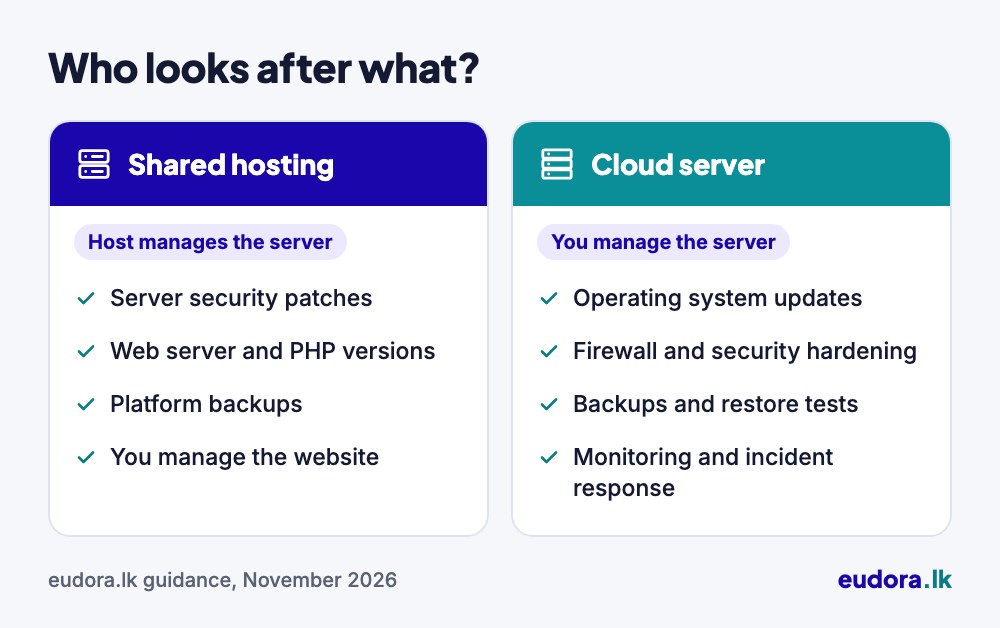
Shared hosting puts many websites on one server, each with a share of its processor, memory and storage. The host manages the operating system, security patches and often backups. You manage your website through a control panel.
A VPS (virtual private server) gives you your own virtual machine with reserved processor and memory, on hardware shared with other virtual machines. You choose the software and settings, and you or your IT provider are responsible for keeping it secure and updated.
A cloud server is a VPS from a large cloud platform such as AWS, Microsoft Azure or Google Cloud, or from cloud-focused hosts. It adds flexibility: resize in minutes, take snapshots, add managed databases, load balancers and content delivery networks, and pay by the hour.
| Shared hosting | E-commerce hosting | VPS or cloud server | |
|---|---|---|---|
| Example | Business Hosting | eCommerce Hosting | Cloud server set up for your app |
| Price | Rs 5,900 a year | Rs 14,900 a year | Setup Rs 24,900, plus monthly server fees |
| Resources | Shared, with limits | Shared, tuned and prioritised | Dedicated, resizable |
| Who manages the server | The host | The host | You or your IT provider |
| Custom software | Limited to what the host provides | Limited | Anything you need |
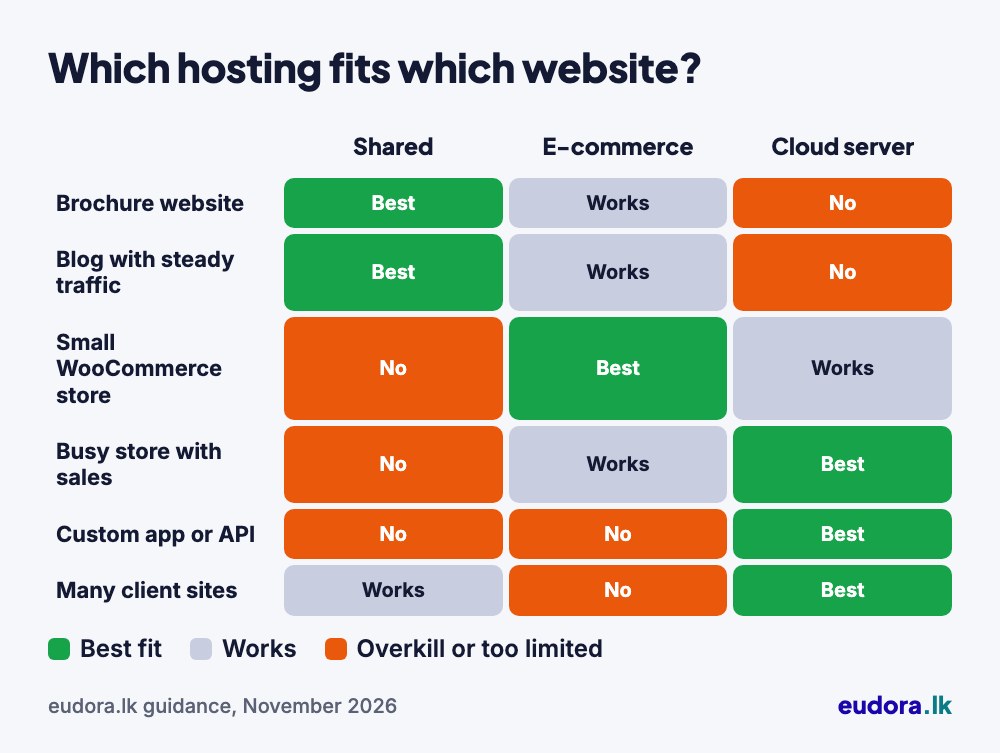
| Best for | Brochure sites, blogs, small business sites | WooCommerce stores up to moderate traffic | Busy stores, custom apps, multiple services |
Signs you have outgrown shared hosting
- Slow at busy times: pages take several seconds to load during promotions or in the evening, even after caching and image optimisation.
- Resource limit warnings: the host reports CPU, memory or process limits being hit, or the site shows “508 resource limit reached” errors.
- Checkout problems: online orders fail or time out when several customers buy at once.
- Software you cannot install: a developer needs Node.js, Python, a specific database, background workers or Docker.
- Many sites on one plan: an agency or group runs a dozen sites that compete for the same resources.
- Security or compliance needs: you need full control over firewall rules, logging or where data is stored.
Before moving, rule out simpler causes. Large images, too many plugins, no caching and a slow theme cause most slow WordPress sites, and they would be slow on any server. Our guide to Core Web Vitals and website speed covers those fixes.
The middle step for online stores
WooCommerce stores have different needs from brochure sites: logged-in customers and carts cannot be cached the same way, checkout needs fast database responses, and order data must be backed up frequently. Specialised e-commerce hosting tuned for WooCommerce, with more storage, daily backups, malware scanning and priority resources, is often enough for a growing store. Our eCommerce Hosting plan costs Rs 14,900 a year, Rs 9,000 more than Business Hosting, and suits most local stores up to a few thousand visitors a day. Our guide to handling traffic spikes on online stores explains when even that is not enough.
What a cloud server really costs
Cloud servers are priced by size, and most are billed in US dollars. A small virtual server with two virtual processors and a few gigabytes of memory typically costs somewhere between about 10 and 40 US dollars a month at mainstream providers, before backups, extra storage, bandwidth and any managed database. The server bill is only part of the cost, though. Someone must install and secure the operating system and web server, apply security updates every month, monitor the server, check backups and respond if something breaks.
A practical first-year budget for a business site on a cloud server is our one-time cloud server setup plus a website care plan for monitoring, updates and backups: Rs 24,900 plus Rs 4,900 a month comes to Rs 83,700 for the first year, plus the provider’s monthly server charges. Our guide to budgeting cloud costs in rupees explains how to keep the provider bill under control.
Warning: An unmanaged server with an outdated operating system or control panel is one of the most common ways small business websites get hacked. If nobody will look after the server every month, stay on managed hosting.
Whatever hosting you choose, keep an independent copy of the website outside the hosting account. A weekly download of the site files and database to an office NAS such as the UGREEN NASync DXP2800 at Rs 149,500 means a hosting account problem, billing dispute or hack never leaves you without your own website.

Managed or unmanaged?
Many providers offer “managed” VPS or cloud hosting, where the provider or a partner handles the operating system, security patches, backups and monitoring, and you manage only the website. It costs more than an unmanaged server but much less than a breach. For most businesses without in-house IT staff, a managed server, or an unmanaged server with an IT provider’s care plan, is the only safe choice. Our web hosting page lists the plans we look after.
Scaling up and down
One of the real advantages of a cloud server is that its size is not fixed. If a sale or a newspaper mention is coming, you can resize the server to more processors and memory for a few days, then shrink it again afterwards, paying only for the hours used. Many providers also let you take a snapshot before any risky change, so a failed update can be rolled back in minutes. For larger sites, the same platform can add a separate managed database, a second web server behind a load balancer, or object storage for images, so the site grows in steps rather than in one expensive jump.
That flexibility only helps if someone watches the numbers. Set up monitoring for processor, memory and disk use, and alerts when they stay high, so you resize before customers notice. Review the size every few months; servers that were enlarged for a busy period are often left running at the larger, more expensive size long after the rush ends.
Where the server should be
For a site whose visitors are mainly in Sri Lanka, choose a server location close by. The nearest major cloud regions are in India and Singapore, which give good response times. A content delivery network in front of the site serves images and pages from locations even closer to visitors and protects against attacks. If the site stores customer personal data, check the location against Sri Lanka’s data protection rules; our guide to cloud data residency and the PDPA explains what to look for.
Moving safely
A move from shared hosting to a cloud server should not cause downtime if it is planned. Set up and secure the new server, copy the site, test it privately, lower DNS time-to-live values a few days before, then switch DNS at a quiet time and keep the old hosting running for a week as a fallback. Email often stays where it is, or moves to Microsoft 365 or Google Workspace at the same time. Our team handles moves like this regularly; see our cloud solutions page.
Making the decision
If your site is a brochure or a small blog, stay on shared hosting and spend the money on content and speed instead. If you run a growing WooCommerce store, move to e-commerce hosting first. Move to a cloud server when you have real evidence that you need it, such as resource limits, slow checkouts during busy periods or software requirements, and when you have someone to manage it. Our web hosting guide compares plans in more detail.
Frequently asked questions
Is a VPS faster than shared hosting?
Usually, because resources are dedicated. But a poorly optimised site stays slow on any server; fix images, caching and plugins first.
Do I need a cloud server for WooCommerce?
Not at first. E-commerce hosting handles most small and medium stores. Move when traffic or order volume outgrows it.
Who looks after a cloud server?
You or your IT provider. The cloud company runs the hardware, but the operating system, software and security are your responsibility.
Will moving hosting affect my email?
It can if email is on the same hosting. Plan the email move separately, or move it to Microsoft 365 or Google Workspace.
Can I move back to shared hosting?
Yes, if the site’s needs fit within shared hosting limits again.
This article was originally published on eudora.lk.