Laptop listings are full of codes such as i5-13420H, 8GB DDR5 and WUXGA, and two laptops at the same price can be very different machines. This guide explains what the codes mean, starting from what you will use the laptop for, with the nine laptops in our shop as examples at September 2026 prices.
Key points
- Start from the work: a Core i3 or i5 with 8GB handles study and everyday office work, while heavy multitasking and photo editing call for 16GB and an H-series or Core Ultra chip.
- Six of our nine laptops can take more memory later. The HONOR MagicBook X16, MacBook Neo and Zenbook 14 cannot, so buy enough on day one.
- Eight of the nine screens are 1920 pixels wide, so compare panel type, brightness and shape instead.
- The MSI Modern 15 comes with DOS and the HP ProBook 4 without Windows: add a licence before comparing prices.
- Confirm the exact model number, as one name can cover different processors, screens or ports.
Start with what you will use it for
Most choices settle themselves once you know the job. A laptop for school assignments needs different things from one that runs accounting software all day or edits product photos for an online shop.
| Main use | What matters most | Sensible starting point | Examples in our range |
|---|---|---|---|
| Study and home | Battery, keyboard, Windows included | Core i3 or i5, 8GB, 512GB SSD | ASUS Vivobook 15 |
| Office and accounting | Many apps open at once, Ethernet, HDMI | Core i5 or Core 5, 16GB or a free memory slot | ASUS ExpertBook B1, Lenovo V15 G5, HP ProBook 4 |
| Photos and design | Screen colour, memory, processor | Core Ultra 5 or H-series, 16GB, wide-colour screen | ASUS Zenbook 14 OLED |
| Travel and meetings | Weight, battery, USB-C charging, camera | Under 1.4kg, efficient chip, 1080p camera | Apple MacBook Neo, ASUS Zenbook 14, HP ProBook 4 |
None of the laptops in our laptop range has a separate graphics card. Built-in graphics are fine for office work, video calls and light photo editing; for 3D design, CAD or gaming, look at a desktop or a laptop with dedicated graphics.
The MSI Modern 15 and HP ProBook 4 ship without Windows, so they are costed in the operating system section instead.
Processors: Core i3, i5, Core 5, Core Ultra 5 and Apple A18 Pro
An Intel name has three parts. The tier (3, 5, 7 or 9) is the rough performance level within a generation. The model number shows the generation: the “13” at the start of i3-1315U, i5-1334U and i5-13420H means 13th Gen, the Core 5 120U comes from Intel’s newer Core (Series 1) family, and the Core Ultra 5 225U and 225H are Core Ultra (Series 2) chips.
The letter at the end matters as much. Intel describes U chips as power-efficient and H chips as high-performance laptop chips. The Core i5-13420H has four performance cores where the 13th Gen and Core 5 U chips here have two, so it copes better with long, heavy jobs such as large spreadsheets or photo exports.
| Processor | Family and type | Cores / threads | In our range |
|---|---|---|---|
| Intel Core i3-1315U | 13th Gen, U | 6 / 8 | ASUS Vivobook 15 |
| Intel Core i5-1334U | 13th Gen, U | 10 / 12 | Dell 15, MSI Modern 15 |
| Intel Core 5 120U | Core (Series 1), U | 10 / 12 | ASUS ExpertBook B1 |
| Intel Core i5-13420H | 13th Gen, H | 8 / 12 | Lenovo V15 G5, HONOR MagicBook X16 |
| Intel Core Ultra 5 225U | Core Ultra (Series 2), U | 12 / 14 | HP ProBook 4 |
| Intel Core Ultra 5 225H | Core Ultra (Series 2), H | 14 / 14 | ASUS Zenbook 14 OLED |
| Apple A18 Pro | Apple silicon | 6-core CPU | Apple MacBook Neo |
The Core Ultra chips add an NPU (neural processing unit), a low-power engine for AI features in Windows and some apps. Apple’s A18 Pro has a 6-core CPU, a 5-core GPU and a 16-core Neural Engine. The MacBook Neo runs macOS, so check that your accounting or billing software has a Mac version first.
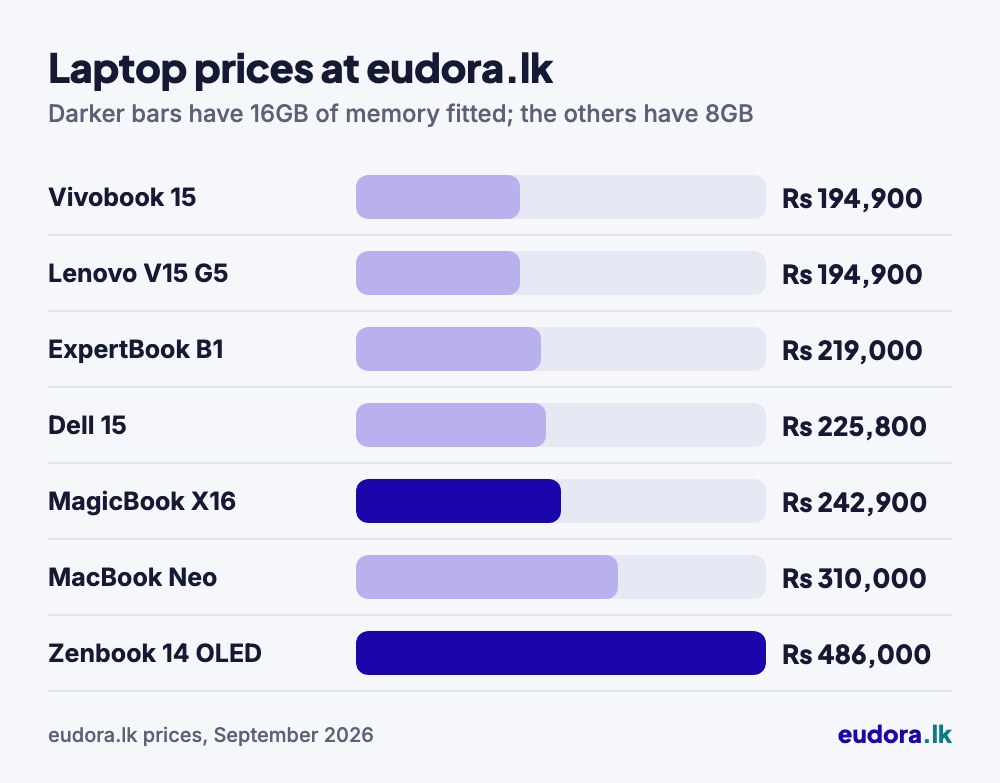
The two lowest-priced laptops show the trade-offs. At Rs 194,900 each, the Lenovo V15 G5 has the stronger Core i5-13420H and an Ethernet port, while the ASUS Vivobook 15 has a Core i3 but comes with Windows 11 Home.
RAM: 8GB or 16GB, and can you add more later?
RAM is the laptop’s working space: the more programs and browser tabs you keep open, the more you need. Microsoft’s minimum for Windows 11 is 4GB; every laptop we sell has at least 8GB, which is enough for study, email, documents and video calls. Choose 16GB if you keep many tabs open next to Teams or Zoom, run accounting software all day or edit photos.
Whether you can add more later depends on the model:
- Can be upgraded: ASUS Vivobook 15 (8GB on the board plus one free slot, up to 16GB according to ASUS), Lenovo V15 G5 (two slots, up to 32GB), and the Dell 15, ASUS ExpertBook B1, MSI Modern 15 and HP ProBook 4 (two slots each).
- Fixed at purchase: HONOR MagicBook X16 (16GB soldered), Apple MacBook Neo (8GB unified memory) and ASUS Zenbook 14 OLED (16GB on the board).
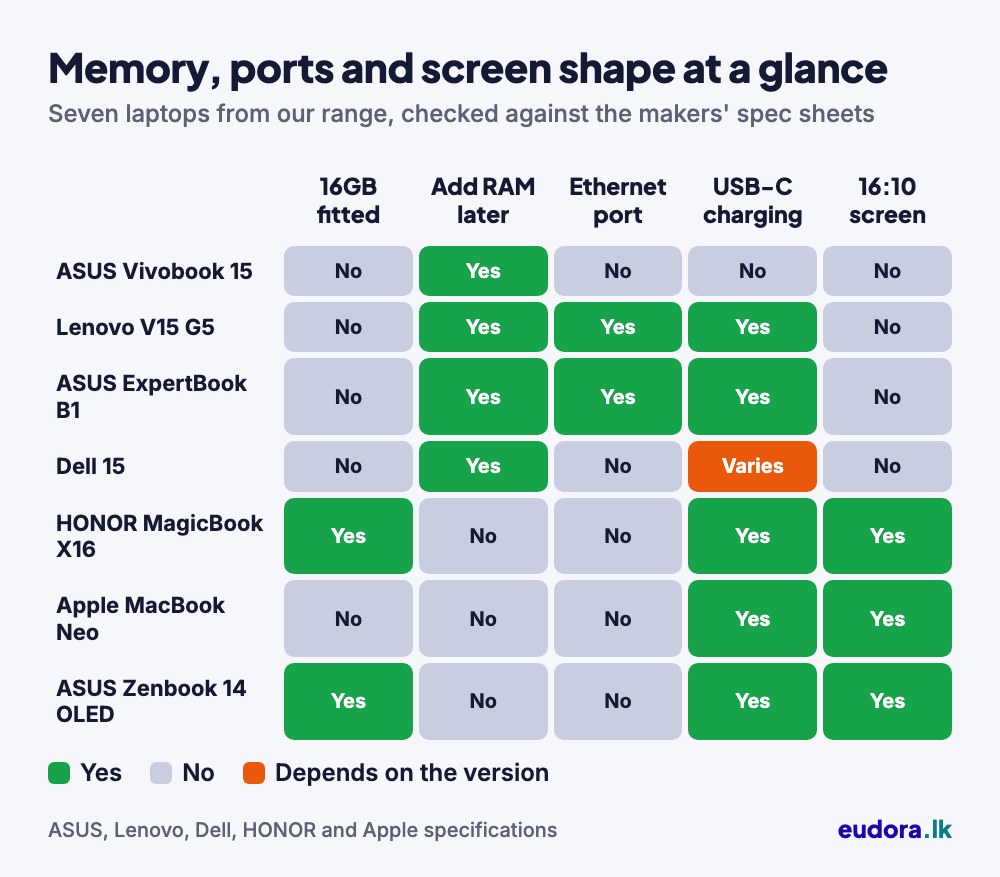
Tip: if a laptop has two slots and one module fitted, a matching second module runs the memory in dual-channel mode. ASUS and MSI note that Intel’s Iris Xe graphics on Core i5 models needs dual-channel memory, so on the Dell 15 or MSI Modern 15 the upgrade helps graphics as well as multitasking.
Storage: why 512GB SSD is the norm
Every laptop we sell has an SSD (solid-state drive): eight have 512GB and the Zenbook 14 has 1TB. SSDs start Windows and open files far faster than the hard drives older laptops used, as our SSD vs hard drive guide explains. Windows 11 needs at least 64GB, so 512GB leaves plenty of room for documents; photos and video fill it faster, so plan for cloud storage or an external drive, and keep a backup.
Before buying a bigger SSD, check the slot. The Vivobook 15 and Zenbook 14 take the common M.2 2280 size, like our Kingston NV3 1TB, but the Lenovo V15 G5 takes the shorter 2242 size, according to Lenovo’s spec sheet. MSI advises using its service centre for SSD upgrades.
Screen: Full HD, IPS, 16:10, 120Hz and OLED
Full HD (1920×1080) is the usual 16:9 shape. WUXGA (1920×1200) is a taller 16:10 shape with about 11% more height for documents, used by the HONOR MagicBook X16, HP ProBook 4 and Zenbook 14; the MacBook Neo’s 2408×1506 screen has almost the same shape.
The panel type matters more than the label. IPS panels keep their colours when viewed from an angle; cheaper TN panels do not, and one model name can come with either. Lenovo lists the V15 G5 with a TN panel rated for 45° left and right but only 15° up, or an IPS panel rated for 85° in every direction. OLED, as on the Zenbook 14, adds deep blacks and a wide colour range (100% of DCI-P3, according to ASUS).
Brightness and colour are the other numbers to read. The budget panels here are 250 to 300 nits against 500 on the MacBook Neo, and the 45% NTSC colour of the Vivobook, Lenovo, Dell, ExpertBook and HONOR screens suits office work but not colour-critical photo editing.
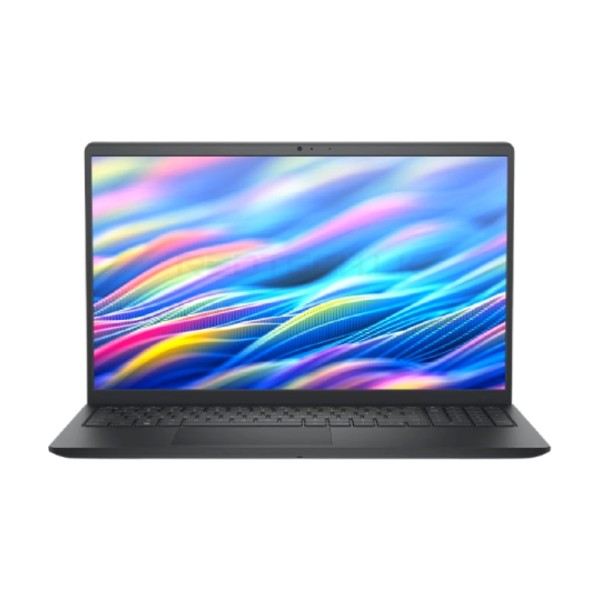
The Dell 15 refreshes at 120Hz instead of the usual 60Hz, so scrolling and moving windows look smoother. It is pleasant, but for office work it matters less than panel type and brightness.
Battery, charging and power cuts
Battery capacity is measured in watt-hours (Wh), the energy stored. It is a fair comparison between similar laptops, but the processor, screen and software decide how long that energy lasts.
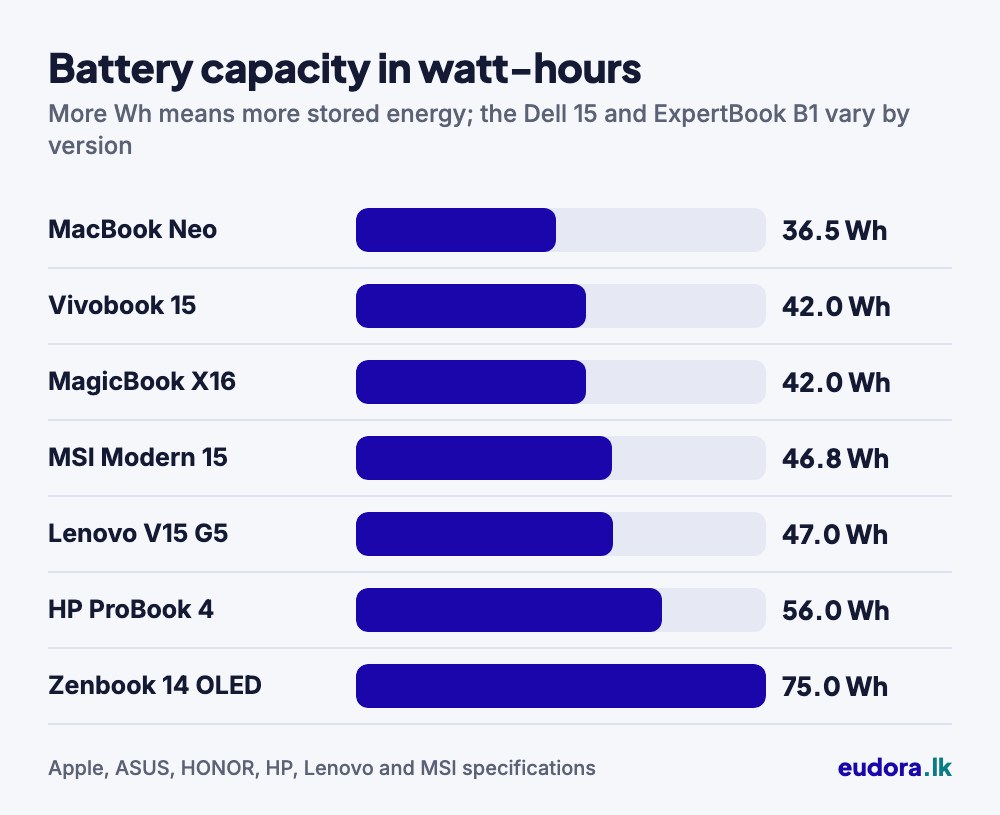
HONOR quotes about 7 hours of local video playback from the MagicBook X16’s 42Wh, while Apple quotes up to 16 hours of video streaming from the MacBook Neo’s 36.5Wh. The tests differ, so do not compare the hours directly, but battery size is clearly only part of the story.
USB-C charging is worth having. Seven of our nine laptops charge over USB-C, so one charger can serve laptop and phone, and a 100W power bank such as the UGREEN Nexode 20000mAh can top the laptop up during a long power cut. The Vivobook 15 and Dell 15 use round-pin chargers (only the aluminium-chassis Dell adds Power Delivery to its USB-C port), and Apple says the MacBook Neo needs at least 20W.
A charged laptop keeps working through a power cut, but your Wi-Fi stops unless the router is on a UPS, as our UPS buying guide explains. Wide-range chargers (100 to 240V on the ASUS, Lenovo and Apple models) do not protect against surges or lightning, which our warranty terms exclude, so plug in through a surge protector or UPS. Apple and Lenovo rate these laptops for use up to 35°C, so do not leave one in a parked car.
Ports and connections
List what you plug in every day. The Lenovo V15 G5, ExpertBook B1, MSI Modern 15 and HP ProBook 4 have an Ethernet (RJ-45) port for offices with wired network points; the others need an adapter or a hub such as the UGREEN Revodok 10-in-1.
USB-C ports also differ. The Zenbook 14 has two Thunderbolt 4 ports (40Gbps, display and charging); the MacBook Neo has one USB 3 port with DisplayPort and one USB 2 port, and supports one external display. Dell’s manual notes that some Dell 15 versions have a data-only USB-C port, and that its HDMI 1.4 port tops out at 1920×1080 at 60Hz: fine for a projector, not for a 4K monitor.
Windows included, DOS or no operating system
A laptop with DOS or no operating system looks cheaper on the shelf, but most people need a Windows licence before using it. The Vivobook 15 comes with Windows 11 Home, HONOR lists Windows 11 Home for the MagicBook X16, the Zenbook 14 comes with Windows 11 and the MacBook Neo runs macOS. The MSI Modern 15 ships with DOS and the HP ProBook 4 without Windows; for the Lenovo, ExpertBook and Dell, confirm the operating system when you order.
| Laptop | Shelf price | Windows licence and setup | Ready to use |
|---|---|---|---|
| ASUS Vivobook 15 (Windows 11 Home) | Rs 194,900 | Included | Rs 194,900 |
| MSI Modern 15 (DOS) | Rs 233,500 | Home Rs 61,000 + setup Rs 3,500 | Rs 298,000 |
| HP ProBook 4 (no Windows) | Rs 472,000 | Pro Rs 89,000 + setup Rs 3,500 | Rs 564,500 |
These totals use our retail licence prices and setup service. Business volume licences do not avoid the cost: Microsoft sells Windows through those schemes as upgrades only, so a DOS laptop still needs a full licence first. Windows 11 Pro adds BitLocker drive encryption, Remote Desktop and Group Policy; our Windows 11 Home vs Pro guide explains who needs them.
Our PC and laptop setup (Rs 3,500 per device) covers Windows installation, drivers, updates, essential software, antivirus and moving your files. If you do it yourself, have an internet connection and a Microsoft account ready: Microsoft requires both to set up Windows 11 Home, and Windows 11 Pro for personal use.
Warranty and what to check before you pay
Every laptop we sell carries the manufacturer’s warranty through the local agent, with the period shown on the product page and your invoice. In our range it runs from Apple’s one-year limited warranty on the MacBook Neo to three years listed for the ExpertBook B1, and several models cover the battery and charger for one year only.
- Match the exact model or part number to the spec you were quoted: HONOR’s global site lists the MagicBook X16 2025 with a Core i3 or i5, its Sri Lankan site with a Core Ultra 5.
- Check the panel type, brightness and refresh rate of that exact model.
- If Windows is included, check it is activated under
Start > Settings > System > Activation. - Ask about the warranty length, battery and charger cover and who does repairs, and keep the invoice.
- On delivery, check the screen, keyboard, ports and charger, and report any fault on arrival within 7 days.
- Set up a backup on day one.
-
 ASUS
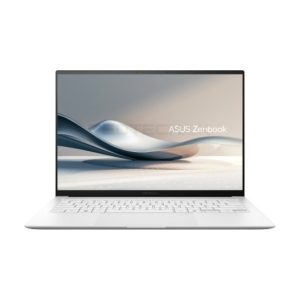
ASUS Zenbook 14 OLED UX3405CA Laptop – Core Ultra 5 225H, 16GB, 1TB SSD
Rs 486,000
Add to cart
-
 HONOR
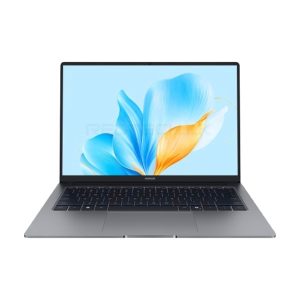
HONOR MagicBook X16 2025 Laptop – Core i5-13420H, 16GB, 512GB SSD
Rs 242,900
Add to cart
-
 ASUS
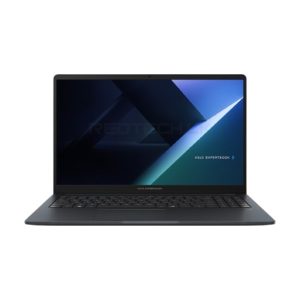
ASUS ExpertBook B1 B1503CVA Laptop – Core 5 120U, 8GB, 512GB SSD
Rs 219,000
Add to cart
-
 ASUS
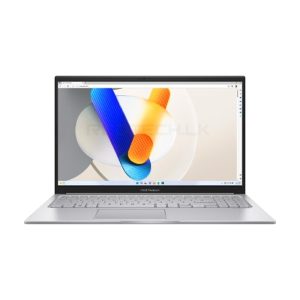
ASUS Vivobook 15 X1504VA Laptop – Core i3-1315U, 8GB, 512GB SSD, Windows 11 Home
Rs 194,900
Add to cart
Not sure which one fits? Tell us what you use your laptop for and which programs you run, and we will suggest a model and, if you like, set it up with Windows, Microsoft 365, antivirus and your files before it reaches you.
Frequently asked questions
Is 8GB of RAM enough for a laptop in 2026?
For study, email, documents and video calls, yes. If you keep many tabs open next to Teams or Zoom, run accounting software all day or edit photos, choose 16GB, or a laptop with a free memory slot so you can add more later.
Should I choose a Core i5 or a Core Ultra 5?
For study and office work, a Core i5 or Core 5 is enough. The Core Ultra 5 225H in the Zenbook 14 adds more cores, Intel Arc graphics and an NPU, which helps with photo editing and heavier multitasking. The Core Ultra 5 225U in the HP ProBook 4 is the power-efficient U version.
Is a laptop with DOS cheaper?
Only on the shelf. Our retail Windows 11 Home licence and setup add Rs 64,500, which takes the MSI Modern 15 from Rs 233,500 to Rs 298,000. Business volume licences do not change this, because Microsoft sells Windows through them as upgrades that need a full licence on the laptop first.
Can I connect a laptop to a monitor or projector?
Yes. Every laptop here except the MacBook Neo has an HDMI port; the MacBook Neo connects one external display through its USB 3 port, using a USB-C to HDMI cable such as the UGREEN MM142.
This article was originally published on eudora.lk.