Software licensing is one of those subjects most people would rather not think about, until a computer shows a “Windows is not activated” watermark, an Office document will not save, or a laptop picks up malware from a so-called activator. In Sri Lanka, unlicensed software is still common, partly because cheap keys are easy to find online and partly because many people are not sure what they are paying for. This guide explains the different kinds of Windows and Office licences, which edition you actually need, how Microsoft 365 compares with one-time Office, and why a bargain key is often the most expensive choice. It applies to home users and small offices alike.
Key points
- Most new computers include a Windows licence already; check before you buy another one.
- Windows 11 Home suits personal use; Windows 11 Pro adds BitLocker encryption, business sign-in and remote management.
- Microsoft 365 is a subscription that includes the latest Office apps, cloud storage and updates; one-time Office never gets new features.
- Very cheap keys are usually resold volume or developer keys that can be blocked at any time.
- Activators and “cracks” are a common way malware reaches home and office computers.
The kinds of Windows licence
A Windows licence is permission to run Windows on a computer, tied to a product key or to a digital licence stored by Microsoft. How the licence was sold decides what you can do with it.
| Licence type | How you get it | Can move to a new PC? | Typical buyer |
|---|---|---|---|
| Pre-installed (OEM) | Comes with a new laptop or desktop | No, it stays with that computer | Anyone buying a new PC |
| Retail (full packaged product) | Bought separately from an authorised seller | Yes, to one computer at a time | Self-built PCs, upgrades, replacements |
| Volume licensing | Agreement between an organisation and Microsoft or its partner | Within the organisation, by agreement | Larger businesses and institutions |
| Grey market key | Resold online, often far below normal prices | Uncertain | Not recommended |
Most laptops and branded desktops in our catalogue, such as the ASUS Vivobook, Lenovo V15 and Dell desktops, ship with Windows 11 already activated. Before buying a separate licence, open Settings, then System, then Activation, and check the status. Some business models are sold without an operating system to reduce cost, and self-built PCs never include one; those are the cases where a retail licence is needed.
Windows 11 Home or Pro?
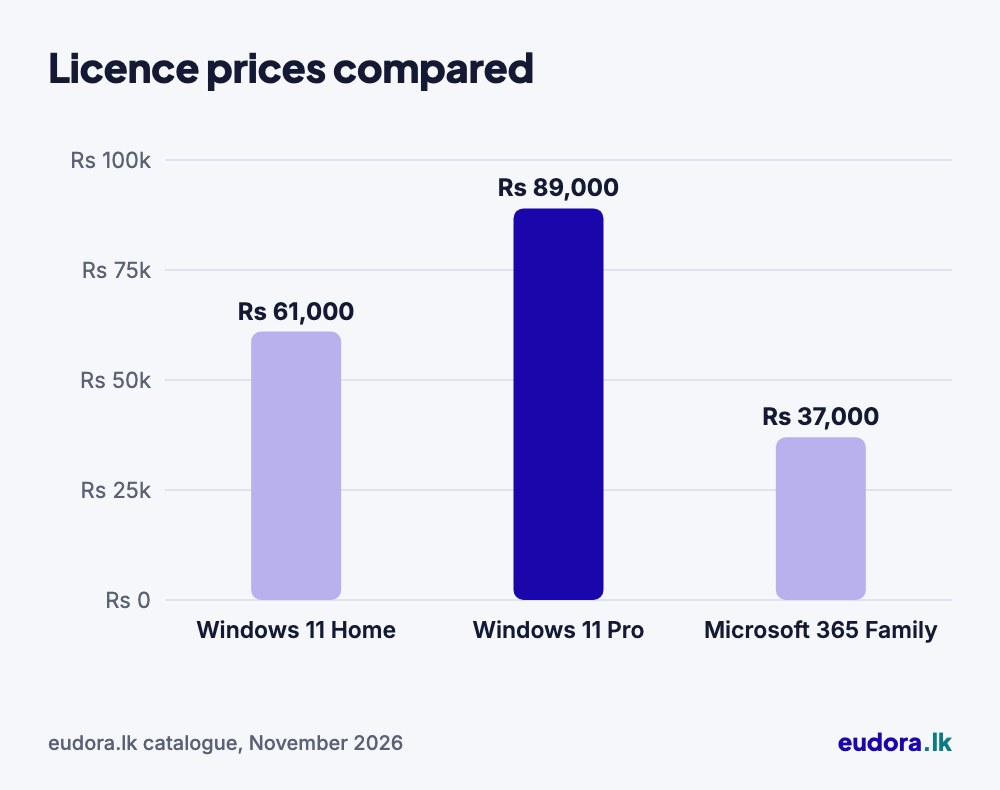
Windows 11 Home is a retail licence at Rs 61,000, and Windows 11 Pro at Rs 89,000. The difference of Rs 28,000 buys features that matter in an office but rarely at home.
| Feature | Home | Pro |
|---|---|---|
| BitLocker full-drive encryption | Device encryption on some PCs only | Yes |
| Join a business domain or Microsoft Entra ID | No | Yes |
| Group Policy and central management | No | Yes |
| Remote Desktop host | No (can connect out only) | Yes |
| Hyper-V virtual machines | No | Yes |
| Windows Update for Business controls | Limited | Yes |
For a home computer, Home is enough. For any office computer that holds customer or financial data, Pro is worth the extra, mainly for BitLocker. If a laptop with BitLocker is stolen, the thief gets the hardware but not the files. Pro also lets an IT provider manage updates, security settings and sign-in centrally, which saves time once you have more than three or four computers.
Windows 10 is no longer supported
Microsoft ended support for Windows 10 on 14 October 2025. Computers still running it no longer receive regular security updates, and each month without patches adds known, exploitable vulnerabilities. If your office still has Windows 10 computers, check whether they can upgrade to Windows 11 for free: many from 2018 onwards can. Older machines that do not meet Windows 11 requirements should be replaced or taken off the network. Our guide to what to do about Windows 10 end of support covers the options in detail.
Microsoft 365 or one-time Office?
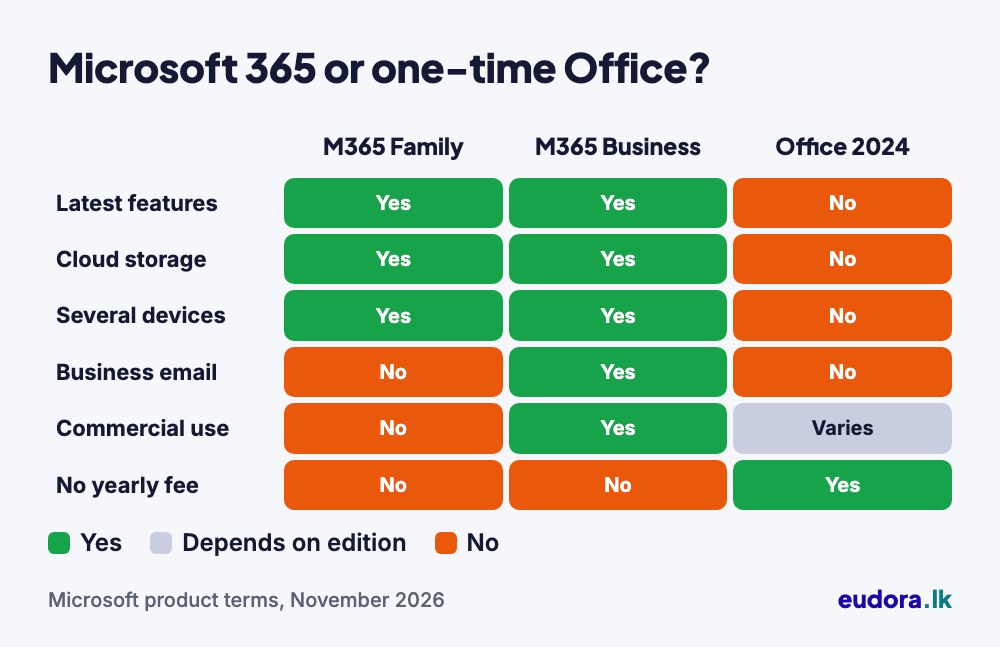
Office now comes in two forms. Microsoft 365 is a subscription that includes Word, Excel, PowerPoint, Outlook and OneNote, always updated to the latest version, plus OneDrive cloud storage. Office Home 2024 is a one-time purchase that installs a fixed version on one computer and receives security fixes but no new features.
For families, Microsoft 365 Family at Rs 37,000 a year covers up to six people, each with their own 1TB of OneDrive storage and the apps on their PCs, Macs, tablets and phones. That works out to about Rs 6,167 per person per year. Students can often use Microsoft 365 free through their school or university account, so check before buying.
For businesses, Microsoft 365 Business plans are licensed per user and add a business email mailbox on your own domain, Teams, SharePoint and, in the higher plans, device management and advanced security. We quote these per user because the right plan depends on your needs; see our software licensing page. Home and Family plans are not licensed for commercial use, so a shop or office should use a Business plan.
Note: Office 2016 and Office 2019 also reached end of support on 14 October 2025. They still open documents, but they no longer receive security fixes, and Office files are a common way for malware to arrive by email.
Why very cheap keys are a bad deal
Online marketplaces and social media pages sell Windows and Office keys for a small fraction of the normal price. Some of these are volume licence keys taken from an organisation’s agreement, keys from developer or education programmes that are not for resale, or keys bought with stolen card details. They often activate at first. Weeks or months later, Microsoft blocks the key, Windows shows as not activated, and there is no refund or support. Office keys of this kind are often limited to one install, so a reinstall after a drive failure fails.
For a business there is a second risk. Software copyright is protected in Sri Lanka under the Intellectual Property Act, and software vendors do run licence audits. Being able to show genuine licences, with invoices, for every computer is part of running an office properly. Our small office IT checklist includes keeping a simple licence register.
Activators and cracks: the malware problem
The other common route is a “KMS activator” or cracked installer that tricks Windows or Office into thinking it is licensed. These tools need administrator rights and usually ask you to turn off antivirus first, which is exactly what malware authors want. Security researchers regularly find activators bundled with information-stealing malware that collects saved browser passwords, banking sessions and crypto wallets, and with remote access tools that give attackers control of the computer.
The cost of a single infected office PC, in lost time, password resets and possible fraud, quickly exceeds the price of a genuine licence. If a computer has ever had an activator installed, the safest course is to back up documents, wipe the drive and reinstall Windows cleanly with a genuine licence. Pair it with good antivirus; our antivirus guide compares the options.
Warning: Never turn off antivirus to install software. Legitimate installers from Microsoft and authorised sellers do not require it.
Buying from an authorised seller also gives you someone to call. If a licence will not activate after a motherboard repair, or a Microsoft 365 renewal does not appear on your account, a reseller with a direct relationship to the distributor can sort it out. A marketplace seller who has moved on to a new shop name cannot.
How to check a licence is genuine
- Windows: Settings, then System, then Activation should say “Windows is activated with a digital licence” or “with a product key”. “Activated by your organisation” on a home PC is a warning sign of a volume key.
- Office: open Word, choose Account, and check the product information names your Microsoft 365 plan or Office version and your own account.
- Invoices: keep the invoice from an authorised seller and record the key or Microsoft account used.
- Price: if the price is a small fraction of the normal retail price, the licence is very unlikely to be genuine.
Licensing a small office
For a small office, a tidy approach is genuine Windows 11 Pro on every computer, a Microsoft 365 Business plan for each person, and good endpoint antivirus. Five computers needing Windows 11 Pro licences come to Rs 445,000, a one-time cost spread over the life of the machines. Our team can supply licences, set up Microsoft 365 with your domain email and move existing mail with our Microsoft 365 setup service at Rs 14,900. Our desktop versus laptop guide helps with the hardware side.
Frequently asked questions
Does a new laptop include Windows?
Most do, already activated. Some business models are sold without an operating system, so check the specification before buying.
Can I move my Windows licence to a new computer?
A retail licence can move to one computer at a time. A pre-installed licence stays with the computer it came with.
Is Windows 11 Pro worth it at home?
Usually not. Home has everything most families need. Pro mainly adds business management and BitLocker.
Can a shop use Microsoft 365 Family?
No. Family and Personal plans are for non-commercial use. Businesses should use a Microsoft 365 Business plan.
What happens if my key is blocked?
Windows shows as not activated, personalisation is limited and reminders appear. Buy a genuine licence and enter the new key in Settings.
This article was originally published on eudora.lk.